
Troubleshooting Tips
Data Not Syncing from Your Bank
If you’ve noticed that new transactions, balances, or investments aren’t showing up in your destination, try these steps to get your syncs back on track.
1. Check if Your Bank Connection Needs to Be Reconnected
Sometimes, Plaid requires you to reconnect your bank for security or account changes.
Open your Bank Connections page in Finta.
If you see a Reconnect indicator next to your bank, click it and follow the prompts.
Once reconnected, return to your Destination and click Refresh to pull in the latest data.

2. Update Your Accounts Manually
If there’s no reconnect message, re-connecting might still fix the main issue
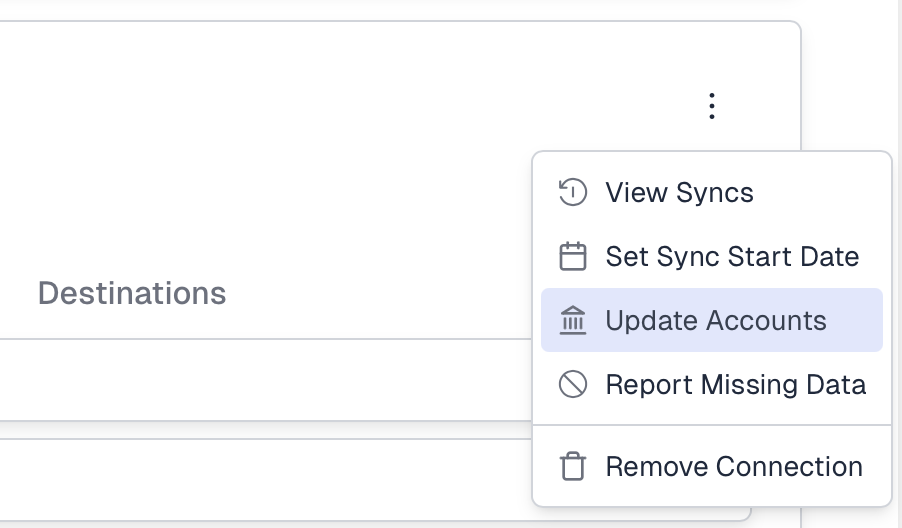
Open the menu next to your bank connection and select Update Accounts.
Go through the Plaid sign-in flow again and make sure all the accounts you want synced to Finta are selected.
When finished, return to your Destination and click Refresh again.
3. Still Missing Data?
If you’ve tried both options and your data still isn’t syncing:
Click Report Missing Data from the same bank connection menu.
Fill out the short form and we'll will follow up shortly to investigate and fix the issue.